


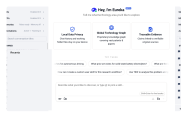





The Intelligent Desktop
for Complex Research
Patsnap Eureka Desktop is built for IP, R&D, and tech intelligence teams. Consolidate research, track technology landscapes, and build on your analysis over time — all in one desktop workspace.
Supports macOS 15/Windows 10 and above versions
What can it help you with?
Where work gets finished, not just started.
From raw files to final analysis — every step happens in one place.
Everything in one place, no more switching back and forth.
Keep your documents, online research, notes, and analysis results together in one workspace, instead of constantly jumping between different tools.
Keep working on the same task, without starting over.
It doesn't stop after answering one question. It keeps building on the same task, adding context, comparing information, and helping you move toward a conclusion step by step.
Past analysis stays visible and useful.
Materials used, intermediate findings, and earlier conclusions are all kept in context, so you can pick up where you left off without asking the same questions again.
Use your own materials directly from your desktop.
Research papers, reports, and project files you have already organized on your computer can be used directly, without extra uploading or format conversion.
Turn repeatable workflows into team capability.
Save common research methods, analysis steps, and workflows so the whole team can reuse them instead of rebuilding the process every time.
Advance complex work without losing control.
It reads materials, delivers results, and uses different capabilities, while keeping clear boundaries around what it can and cannot do — making it safe to use in company workflows.
Everything in one place, no more switching back and forth.
Keep your documents, online research, notes, and analysis results together in one workspace, instead of constantly jumping between different tools.
Keep working on the same task, without starting over.
It doesn't stop after answering one question. It keeps building on the same task, adding context, comparing information, and helping you move toward a conclusion step by step.
Past analysis stays visible and useful.
Materials used, intermediate findings, and earlier conclusions are all kept in context, so you can pick up where you left off without asking the same questions again.
Use your own materials directly from your desktop.
Research papers, reports, and project files you have already organized on your computer can be used directly, without extra uploading or format conversion.
Turn repeatable workflows into team capability.
Save common research methods, analysis steps, and workflows so the whole team can reuse them instead of rebuilding the process every time.
Advance complex work without losing control.
It reads materials, delivers results, and uses different capabilities, while keeping clear boundaries around what it can and cannot do — making it safe to use in company workflows.
Advantages
Why Choose Eureka Desktop
A dedicated workspace for knowledge teams to keep complex work moving
— not another general-purpose AI tool.
Local by design,
controlled by you
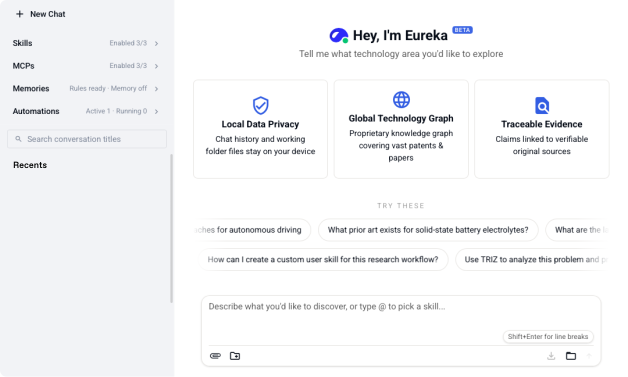
Work history and knowledge stays local by default.External processing only happens when configured,so your data boundaries remain clear and controlled.
Traceable evidence,
trusted conclusions
Every insight is linked to its source,from literature snippets to the final report,with a complete and traceable reasoning path.
Domain intelligence,
built for expert work
Domain experts continuously refine data, models,and workflows, so every analysis meets industry standards—not generic model output.
Patsnap data foundation
Built on Patsnap’s global patent and literature database,covering 174 jurisdictions with real-time updatesand trusted source data.
System-level security and
control
Access stays in your control.It only works with the files and content you choose to share,and asks for confirmation before any sensitive action.
Expandable with MCPs
and Skills
Turn expert workflows into Skillsand connect systems through MCPs,so capabilities keep expanding with your needs.
Testimony from users
Feedback from real work scenarios
First-hand user experience from the IP, R&D, and technical intelligence teams.
Questions You May Have
Frequently Asked Questions About Eureka Desktop
① Describe the workflow you want in the chat, and the desktop app will automatically generate the corresponding Skill.
② After completing a task, if the result looks useful, you can turn the conversation into a Skill and reuse it next time.
③ Download a Skill package from a third-party platform and drag it into the chat to install it.
MCPs are even easier to install: paste an MCP link into the chat, and the configuration can be completed directly through the conversation
Sustainable research, built for desktop.
Download your version:
Supports macOS 15/Windows 10 and above.